Points & Aspects Settings
How to choose which bodies, points, and aspects appear on a chart and adjust orbs, on the Bodies, Aspects, and Look tabs of Display settings.
Display settings lets you choose which bodies (planets and sensitive points) and aspect types appear on a chart, and adjust the orb (tolerance in degrees) for each aspect.
Open Display settings with the gear on a chart screen, Home, or Ephemeris, then use the tabs below.
Bodies and points (the Bodies tab)
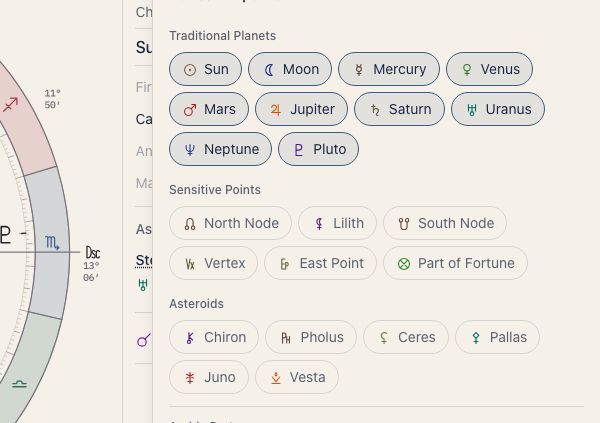
Bodies are grouped as chips that you switch on or off one at a time.
Traditional Planets
This group lists all ten planets, Sun to Pluto. The Traditional preset hides Uranus, Neptune and Pluto.
Sensitive Points
North Node, Lilith (True), South Node, Vertex, East Point, and Part of Fortune.
The North Node is the true node and Lilith is the true Lilith (the instantaneous position of the lunar apogee). Mean positions are not available. The South Node is opposite the North Node (180°) and appears only while the North Node is shown.
Asteroids
Chiron, Pholus, Ceres, Pallas, Juno, and Vesta.
Arabic Parts
Arabic Parts (also called lots) are points worked out from the positions of two bodies and one point. The chart labels the first one “Part of Fortune”, and so do the chips on the Bodies tab.
Besides Part of Fortune, you can switch each of these on or off, and only the ones you pick appear on the chart. At first only Part of Fortune is on.
- Part of Spirit: a point read for the direction your will takes
- Part of Eros: a point read for passion and what draws you
- Part of Marriage: a point read for partnership and marriage themes
Fixed stars
Show fixed stars detects and shows conjunctions between fixed stars and bodies. Prominent stars such as Regulus, Algol, Spica, and Antares appear on the zodiac ring.
The Fixed star orb slider sets how close a body must be to a star to count as touching it, from 0.5° to 3°. A narrower orb highlights only very tight alignments. The orb is unavailable while fixed stars are off.
Aspects and orbs (the Aspects tab)
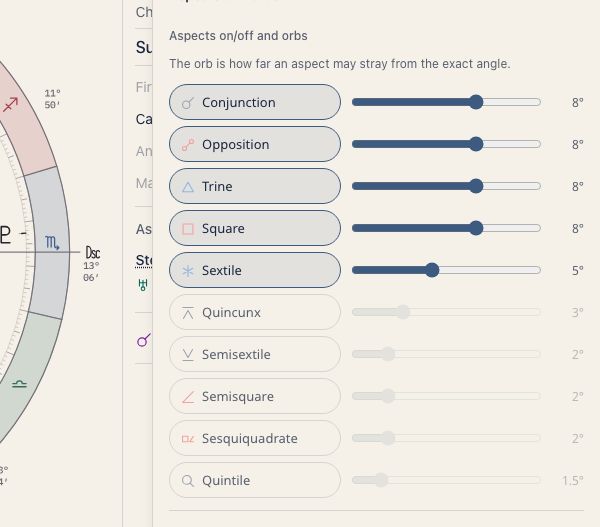
Each aspect has an on/off chip and a slider for its orb. The orb is how far an aspect may stray from the exact angle.
You can choose from ten aspects: conjunction, opposition, trine, square, sextile, quincunx, semi-sextile, semi-square, sesquiquadrate and quintile. Biquintile, septile and novile are not available.
Major aspects
Conjunction (0°), Sextile (60°), Square (90°), Trine (120°), and Opposition (180°). These are the five fundamental aspects.
Minor aspects
Semi-sextile (30°), Semi-square (45°), Sesquiquadrate (135°), Quincunx (150°), and Quintile (72°). Switch them on when you want a more detailed reading.
Sun and Moon bonus
The Sun and Moon are thought to carry more weight, so Sun bonus and Moon bonus widen the orb only for aspects that involve them. Aspects to the Sun or Moon are then detected over a wider range.
How lines are drawn
- Line thickness by orb: the tighter the orb (closer to exact), the thicker the aspect line
- Applying / Separating: aspects still building to exact are drawn solid, and those moving apart are dashed
Transit and progressed orbs
On the triple wheel, Transit orb and Progressed orb set the width used for transiting and progressed bodies against natal bodies in the list.
Degree labels (the Look tab)
Under Labels, choose what appears beside each body: degree, sign, minute, and R (retrograde), each on or off. Quick-pick buttons (Full, Compact, Glyph only) set them together. The triple wheel never draws minutes.
Reset to standard
If you have changed too much, press Reset to standard on the group to put that group’s settings back.
Related pages
- Planets — what each planet means and how to read it.
- Calculation Presets — switch planet, aspect, and orb settings together. The default settings are listed there too.