Home
How to use the date strip, daily reading, wheel, period card, shared sky, coming events and reflection. Also covers Home without birth details or while signed out.
Home shows where today’s sky touches your birth chart. Open it from Home in the sidebar or from the logo.
On a wide screen, the date strip and Today’s line sit above three columns: the wheel and This period, Where today’s sky touches your chart, then Coming up and Today’s sky (for everyone). On a phone, they stack vertically.
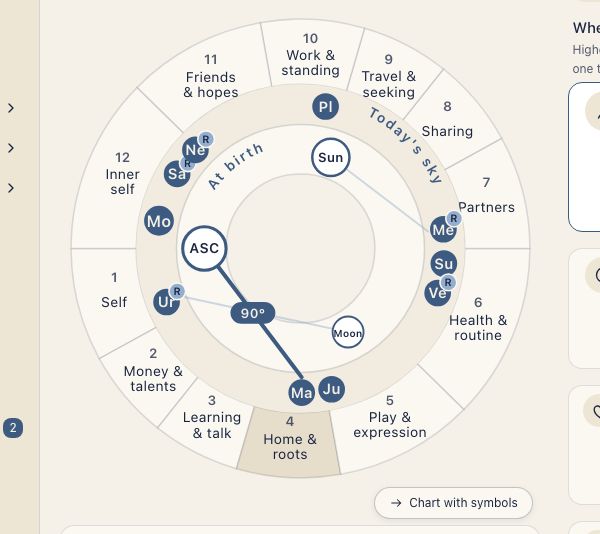
The three cards on Home match three points of your birth chart:
| Card | Point in the birth chart |
|---|---|
| How you come across | Ascendant (ASC) |
| Your core | Sun |
| Feelings | Moon |
Choose a date
The strip shows seven days starting Monday. Use the arrows to move one day at a time, or open the calendar from the date heading. The wheel and readings follow the selected date. Back to today appears when you are viewing another day.
Today’s line
A short reading and its reason draw on the Moon’s position and the angles between that day’s sky and your natal Ascendant (ASC), Sun and Moon.
The wheel and this period
Home opens with a simple wheel: your houses with the selected day’s sky overlaid. Select a house to read its meaning. Chart with symbols switches to the standard chart showing your birth chart and that day’s sky together. Back to the simple wheel returns to the first view.
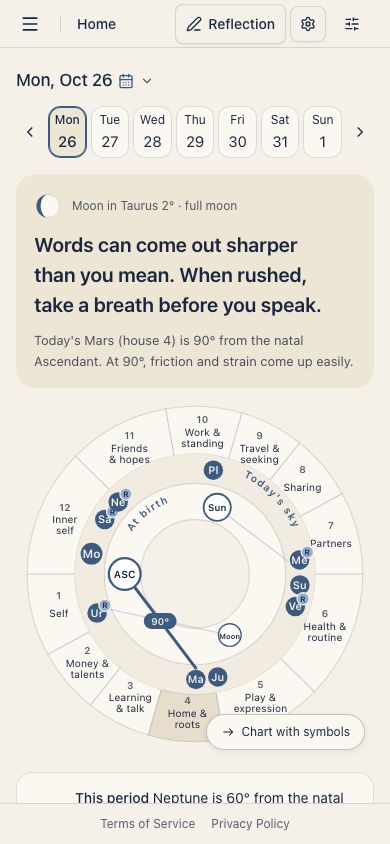
This period below the wheel describes an angle that a slow-moving planet makes to an important point in your chart and that lasts a while. While a house is selected, its explanation appears in that space. The header gear, Display settings, opens the wheel’s appearance and calculation settings.
Where today’s sky touches your chart
Cards for How you come across (ASC), Your core (Sun), Feelings (Moon) and Other show how the sky meets your chart. Higher cards carry more weight in the birth chart. The order is fixed: How you come across, Your core, Feelings, then Other. Select one to change the lines on the wheel.
For a closer look, see Stars touching your chart.
Coming up and today’s sky
What Coming up lists depends on whether you have birth details. With them, you see the next full and new moons, the next seasonal turning point (the equinoxes and solstices) and your birthday. Without them, you see full and new moons and the days planets turn retrograde or direct. Select any row except your birthday to open that day’s events in the Ephemeris. With your birth details added, This year’s theme also appears.
Today’s sky (for everyone) shows the Moon, the void, retrogrades and the day’s events. The void is the void-of-course Moon: the stretch of time before the Moon enters its next sign, when it makes no major angle. See Using void-of-course time. See the Ephemeris opens the detailed positions and events.
Today’s reflection
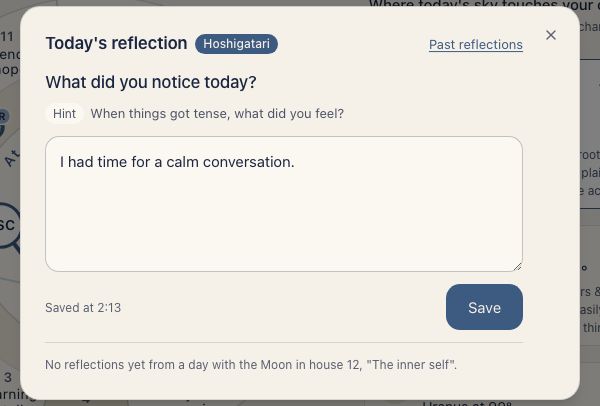
When your own birth details are present, Today’s reflection appears in the header. It opens a dialog for the date you are viewing. Write what you noticed and press Save. Today’s reflection is a Hoshigatari plan feature. It is free during the beta. When the beta ends, the free Hoshiyomi plan shows a lock.
Without birth details, or while signed out
If no entry is marked as yours, Home shows a banner saying Your birth details aren’t added yet. The wheel shows Today’s sky on the zodiac wheel. You can still choose dates and read The sky ahead and Today’s sky (for everyone). A preview explains what the personal cards will show once you add birth details.
Signed-out visitors see the same shared sky. Add birth details opens sign-up for them; for signed-in people it opens the Your own birth date step. A birth time is optional. See Sign up and add your own birth date.
Home uses the entry carrying the Me badge in Birth Details. See Managing Birth Details to change it.