Synastry
How to overlay two birth charts to explore compatibility between two people.
Synastry overlays two natal charts on a single wheel, so you can see how one person’s planets relate to another’s. The aspects (angles) between the two sets of planets give you a way into how the two people tend to interact.
You can use it for romantic partners, family, friends, and colleagues.
Accessing Synastry
Open Synastry from Compatibility in the sidebar. If you have chosen a person under Birth Details first, that person becomes the inner ring (the base).
Choose the person to overlay (the outer ring) with Choose who to compare at the top of the chart. A dialog lists your saved birth details, and the chart is drawn once you pick one.
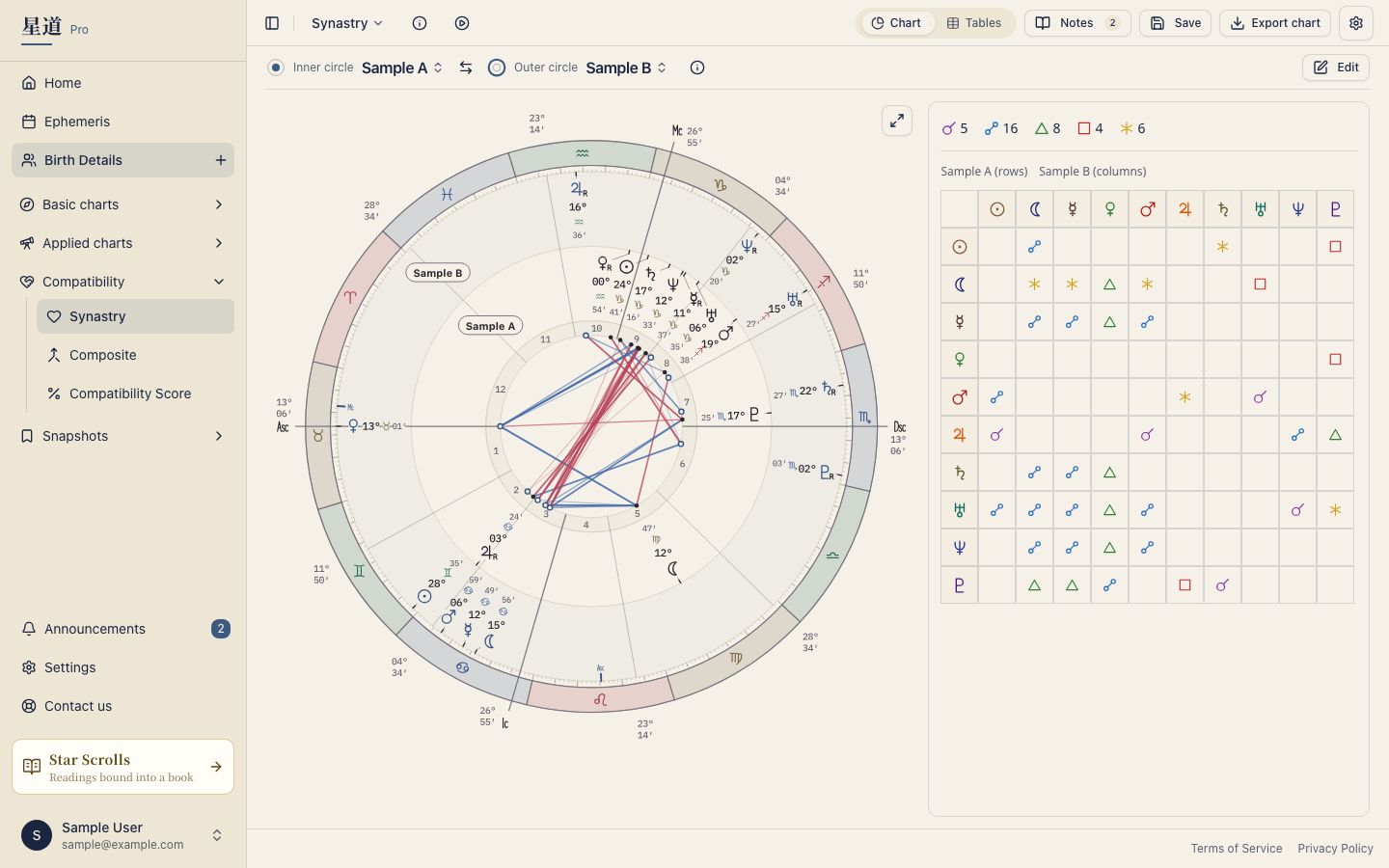
You can change the pairing at any time. Press the compared person’s name above the chart to reopen the dialog. The Swap button between the two names switches the base and the compared person.
You can also press the chart title to switch to another chart.
Reading the chart
The synastry wheel uses a two-ring layout: an inner ring and an outer ring.
Inner ring: the base person’s natal planets
The inner ring displays the base person’s natal planetary positions. House cusps are also calculated from the base person’s birth details.
Outer ring: the compared person’s natal planets
The outer ring displays the compared person’s natal planetary positions. By reading which of the base person’s houses contain the compared person’s planets, you can see which areas of life the other person is most likely to touch.
Cross-aspect lines
The aspect lines drawn across the center of the wheel represent aspects formed between the base person’s planets and the compared person’s planets. Unlike the Single Wheel, which shows aspects between one person’s own planets, Synastry shows only inter-chart aspects between the two individuals.
- Red lines: hard aspects (square, opposition, and so on)
- Blue lines: soft aspects (trine, sextile, and so on)
The colors depend on the chart theme. In Classic, the lines are shades of gray.
Cross-aspect matrix
On the Chart view, the cross-aspect matrix sits to the right of the wheel (below it on a phone). It lists all of the base person’s planets along the rows and all of the compared person’s planets along the columns, with each cell showing any aspect that forms between the pair.
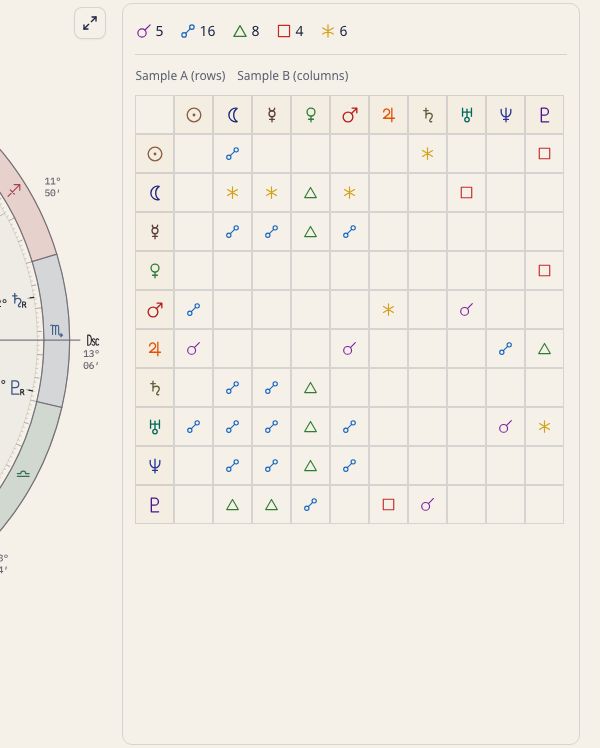
The matrix shows angles that can hide behind overlapping lines on the wheel. Hover over a cell to see a tooltip explaining the aspect, and the matching line lights up on the wheel; press it to keep the line selected. The Tables view shows each person’s planet table side by side instead.
Tooltips
Hovering over (or tapping) a planet glyph or aspect line on the chart reveals a tooltip. In Synastry, the tooltip clearly identifies which person the planet belongs to, so there is no confusion between the inner and outer rings.
Tooltip content and behavior can be adjusted in Tooltip Settings.
Exporting the chart
You can export Synastry as an image or PDF. For instructions and supported formats, see Chart Export.
A Star Scroll for the pair
For a written reading of the pair, press Create a report for these two on the Compatibility Score screen. It opens the creation page with both people already selected. See Compatibility Score for that screen.
Related pages
- Composite Chart: the midpoint companion to synastry, reading the relationship itself as a single chart.
- Compatibility Score: six category numbers worked out from the synastry angles.