Draconic Chart
What the draconic chart is, how it differs from the tropical natal chart, how to compare the two, and how to open it.
A draconic chart recalculates the natal chart with the North Node moved to 0° Aries, and every other planet shifts with it. The angles between planets stay the same as in the natal chart, and only the signs change. Some people place it beside the natal chart as a supporting view, to see what stays in the same sign and what moves. The name comes from the Latin “draco” (dragon), a nod to the North Node’s traditional name, the Dragon’s Head.
Use it when you want to look again at the same planets, with the signs measured from a different starting point. It is an applied chart, so read it after you are comfortable with the birth chart and the Single Wheel.
What is a draconic chart
In a standard tropical chart, positions are measured from the vernal equinox (0° Aries). A draconic chart replaces that reference point with the North Node.
Each planet’s longitude is recalculated by subtracting the North Node’s longitude, which gives a new set of sign placements. The house cusps and the ASC and MC shift by the same amount, so each planet stays in the same house as in the birth chart. HOSHIDOU’s North Node is the true node. The draconic positions change with the type of node, so this chart will not match one built with the mean node.
How it differs from the tropical chart
The tropical and draconic charts use the same planets but measure from different reference points.
| Aspect | Tropical | Draconic |
|---|---|---|
| Reference point | Vernal equinox (0° Aries) | North Node |
| Aspects | Identical | Identical (angles between planets do not change) |
| Sign placements | Different | Different |
How to compare it with the natal chart
The basic use is to put the natal chart and the draconic chart side by side and look at where the signs differ.
- Draconic Sun sign: check whether it matches the natal Sun sign or has moved.
- Draconic Moon sign: set it beside the natal Moon sign and check the same way.
- Other planets: separate the planets whose sign moved from the ones that stayed in the same sign.
The signs move because the reference point changed. Both charts are made from the same planetary positions, so read the differences as a comparison: “this is how it looks from a different starting point”.
How to open it
You open a Draconic chart from Applied charts in the sidebar.
- Choose a person under Birth Details in the sidebar
- Select “Draconic” under Applied charts
You can also press the chart title on any chart screen and switch to it from there. The chart is calculated and displayed right away.
Reading the chart
Reading a draconic chart follows the same principles as reading a natal chart. Sign meanings apply as they are. HOSHIDOU’s draconic chart moves the house cusps and the ASC and MC along with the planets. Each planet stays in its birth-chart house, and only the signs change.
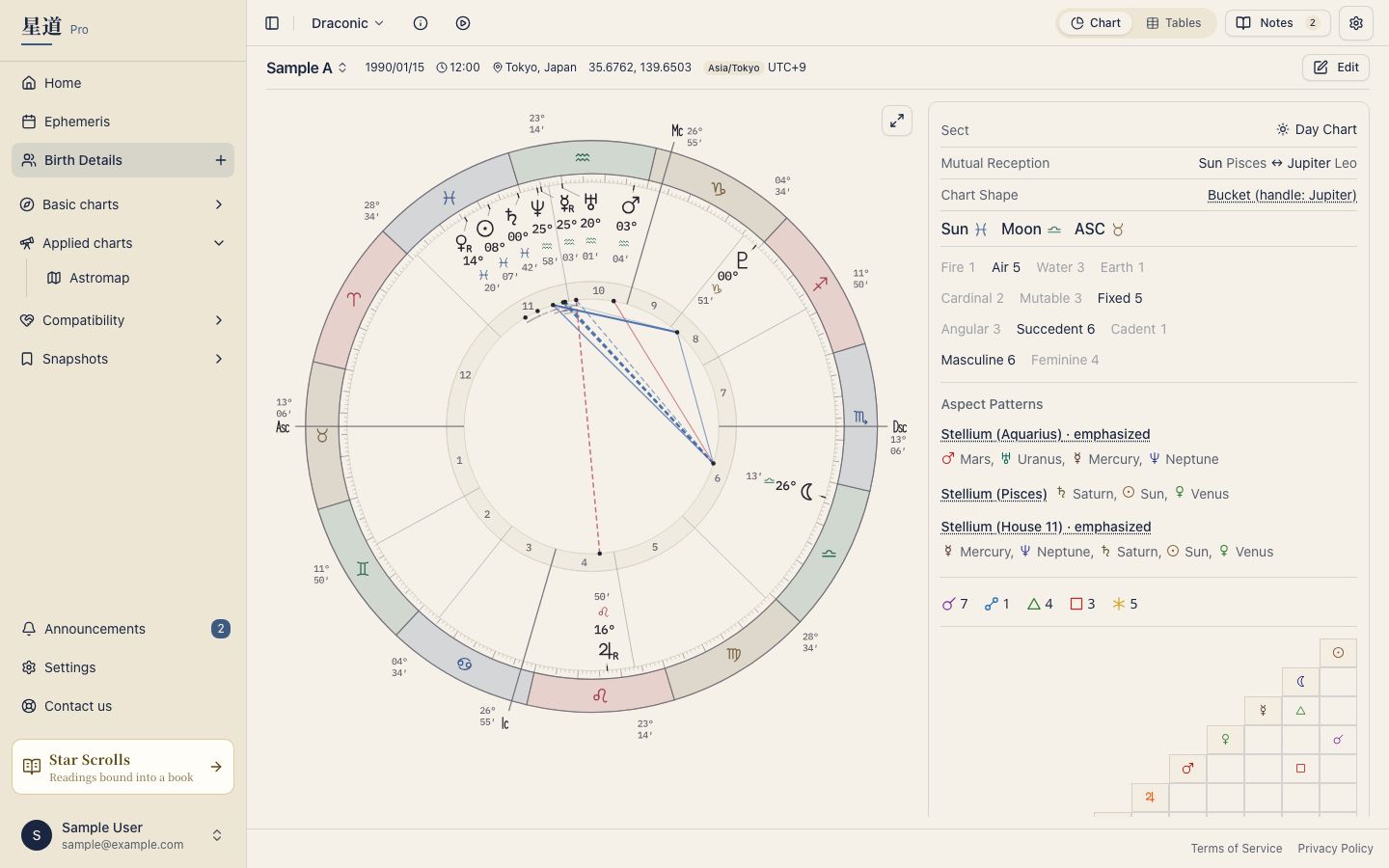
Placing the tropical natal chart beside the draconic chart shows where the signs differ and where they agree. You can view the natal chart via Single Wheel.
Tables and tooltips
Draconic charts have the same data panel and table view as the Single Wheel, including the planet table and the house cusp table (the cusps are draconic values too). Hover over a planet glyph (press it on a phone) to see a tooltip with the draconic-adjusted degree.
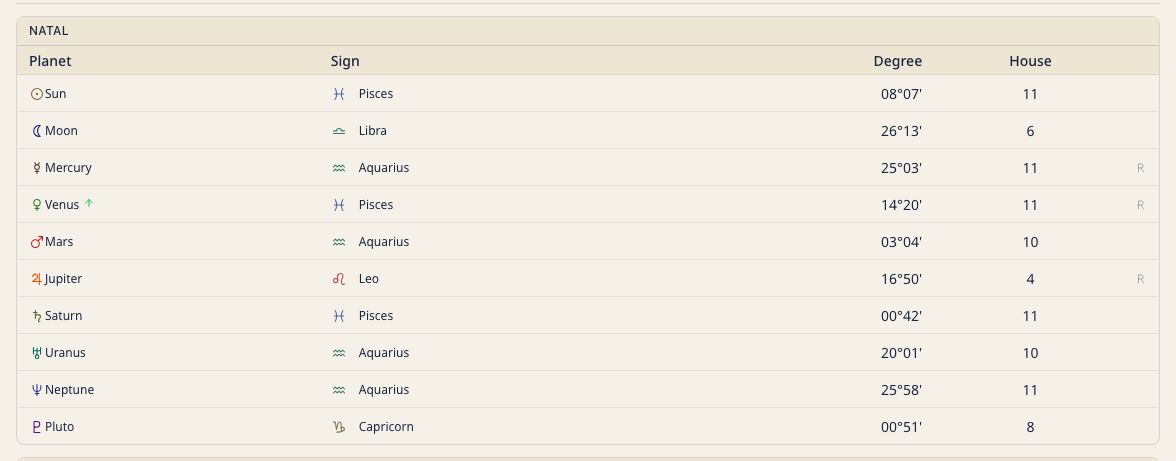
You can change tooltip content in Tooltip Settings.