Ephemeris
How to view daily planetary positions and astronomical events by month.
An ephemeris is a reference table of the daily positions of the planets, plus the month’s main astronomical events. HOSHIDOU’s ephemeris shows where each planet sits every day, when signs change, and when retrogrades begin, all organized by month. Open it from Ephemeris in the sidebar.
It has two views: a Positions tab and an Events tab.
Positions tab
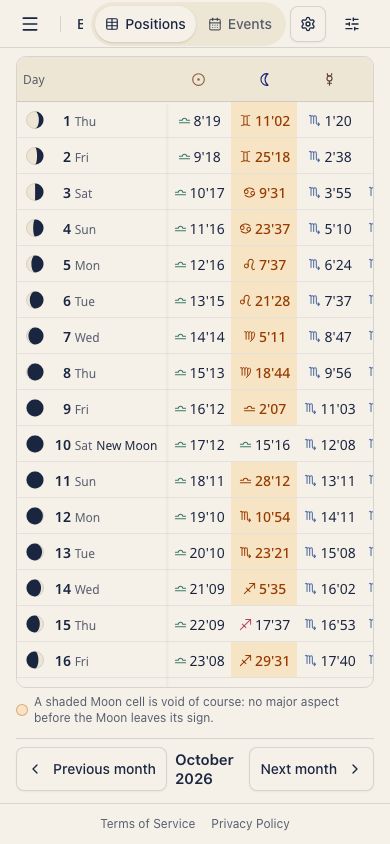
The Positions tab shows a monthly table of planetary positions, with one row per day. Each column shows the sign and degree for one planet.
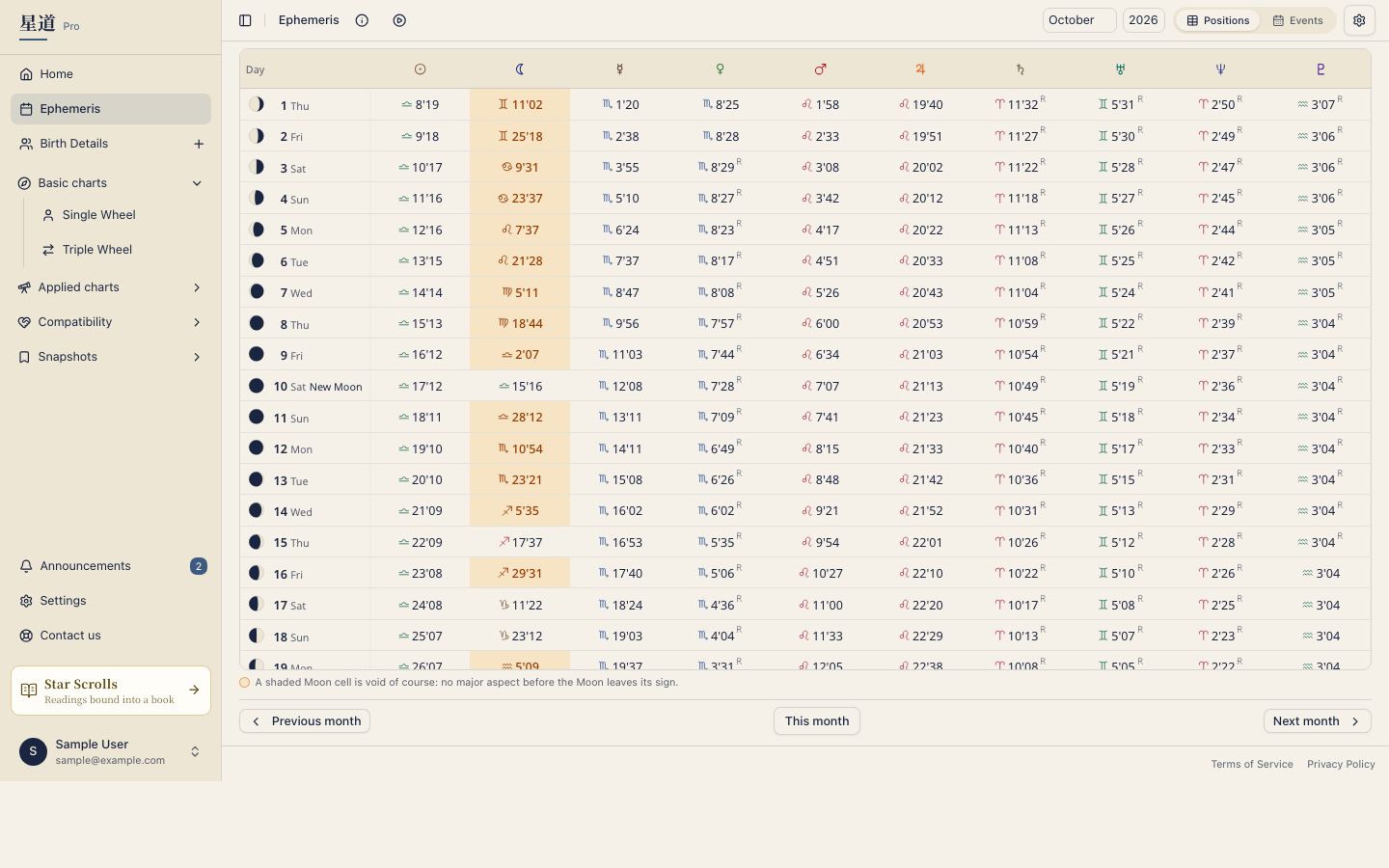
For example, you can quickly confirm that Mars was at 22°15’ Leo on February 5th. This view helps when a planet is near a sign boundary, or when you want to follow a retrograde day by day.
The values in the Positions tab are the positions at noon Universal Time each day (21:00 in Japan).
Void-of-course Moon
The Positions tab also shows when the Moon is void of course: the stretch from the Moon’s last major aspect in its current sign until it enters the next sign. The check counts the Moon’s major aspects (conjunction, 60°, 90°, 120°, 180°) to the Sun and to Mercury through Pluto, nine bodies in all.
People have long used this window as a cue to hold off on committing to something new. Whether you use it is up to you. The idea is explained in Using void-of-course time.
Hover over a colored Moon cell (press it on a phone) to see the start and end time and the last aspect. Nothing appears if you have turned tooltips off.
Events tab
The Events tab lists the month’s main astronomical events in order. It shows timing shifts that are easy to miss on a wheel chart, much like a calendar.
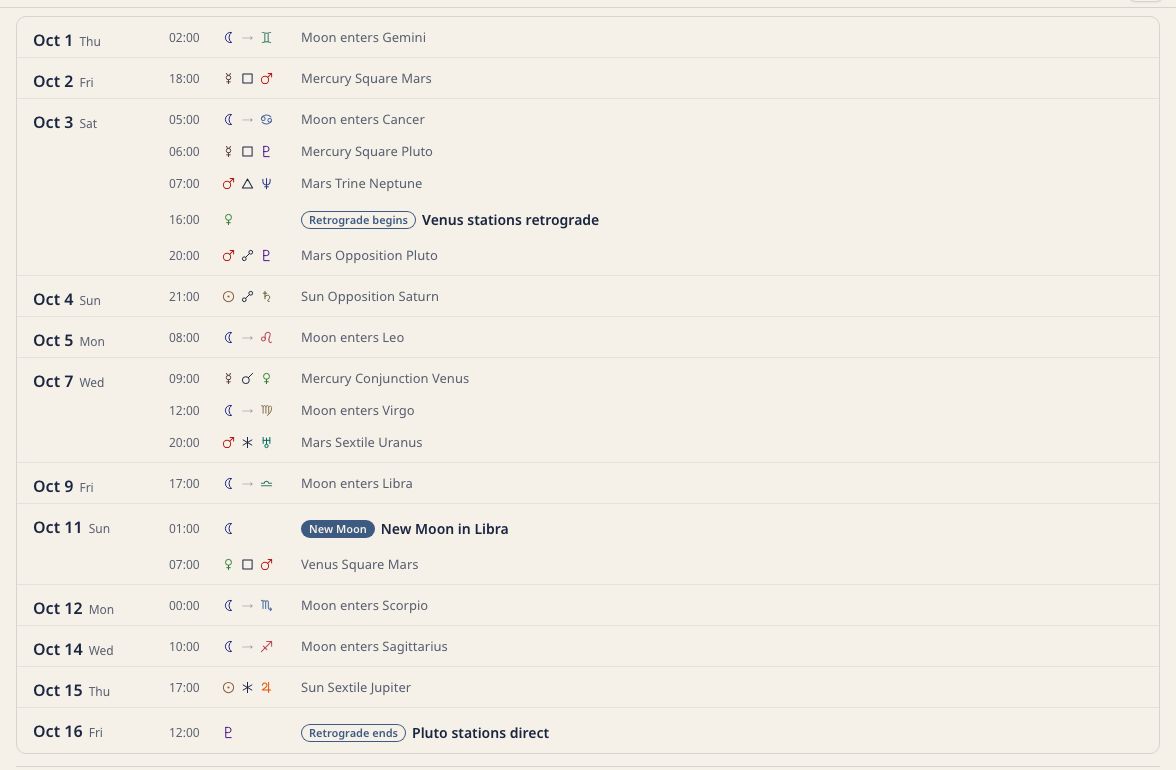
Event times appear in the time zone of the device you are using, rounded to the nearest hour. Hover over an event (press it on a phone) for a description of the event and its type.
Ingresses
Shows when a planet enters a new zodiac sign. For instance, you can see when Venus moves into Pisces or Mars enters Taurus.
Retrograde and direct stations
Shows when a planet stations retrograde (appears to reverse direction) and when it stations direct (resumes forward motion). You can follow Mercury retrograde and the retrograde periods of the other planets.
Exact aspects
Lists the date and time when two planets form an exact aspect, such as a conjunction, opposition, or trine. You can see in advance which day an angle becomes exact.
New and full moons
Shows the date and time of each new moon and full moon, and the sign it falls in.
Changing the month
Use the year and month selectors in the header to choose the month. The previous month, this month, and next month buttons at the bottom of the screen move one month at a time. Step back to review past placements, or move forward to preview upcoming events.
Which bodies appear
Use the gear at the top right of the ephemeris to open Display settings, and choose bodies on the Bodies tab. The Positions tab follows that selection. Any body you turn off there is also hidden from the position table.
Press a dated row under Coming up on Home to open the Events tab for that month with the day highlighted.
Adding events to your calendar
You can bring ephemeris events into a calendar app. Export works well for one month. Subscribe if you want events to keep arriving on their own.
Export one month
Press Export to calendar on the Events tab to download that month’s events (ingresses, retrograde stations, exact aspects, and new and full moons) as an iCal file (.ics). Import the file into Google Calendar, Apple Calendar, Outlook, or any app that reads .ics files.
Subscribe
- Press Subscribe to calendar on the Events tab.
- Choose the bodies and the event types (ingresses, stations, aspects, new and full moons).
- Press Add to calendar, or paste the subscription URL into Google Calendar, Apple Calendar, or Outlook.
The feed covers the past month and the next 12 months, and refreshes every six hours. Each event appears on your calendar as a one-hour entry.
Related pages
- Stars touching your chart: the same planetary motions, seen against your own birth chart on Home.