Traditional Techniques
An overview of the Hellenistic and traditional techniques HOSHIDOU shows, namely essential dignities, mutual reception, declination and out-of-bounds, and fixed stars.
HOSHIDOU includes traditional and Hellenistic techniques alongside the modern planet-and-aspect picture. On the Single Wheel, rows and tables show essential dignity (how easily a planet shows its strength in a sign), mutual reception, declination, and fixed-star conjunctions. They are written for people who are studying astrology, so read this page once you are comfortable with the Single Wheel.
This page gives a short overview of each technique, how the app shows it, and where to switch it on or off. They work together with timing techniques like Profection Year and with Sect.
Under Preset on the Look tab of Display settings, Traditional selects the seven classical bodies and nodes, five major aspects, and Whole Sign houses together. Modern Western and Evolutionary are the other choices. See Calculation presets.
Essential dignities
Essential dignity describes how easily a planet shows its strength in the sign it is in. HOSHIDOU shows four states:
- Domicile: the planet is in a sign it rules (its home), where it is said to show its nature most fully.
- Exaltation: the planet is in a sign where it is honored and strengthened.
- Detriment: the planet is in the sign opposite its domicile, where it is said to work against its grain.
- Fall: the planet is in the sign opposite its exaltation, where its strength is reduced.
Triplicity, term, and face are not shown. The badges on screen are named Domicile, Exaltation, Detriment, and Fall.
In the app, a dignity badge appears next to each planet in the planet table (the setting is called Show dignities). Badges are given only to the seven classical planets (Sun, Moon, Mercury, Venus, Mars, Jupiter, Saturn), judged with the traditional rulerships. For example, Mars rules Scorpio and Saturn rules Aquarius.
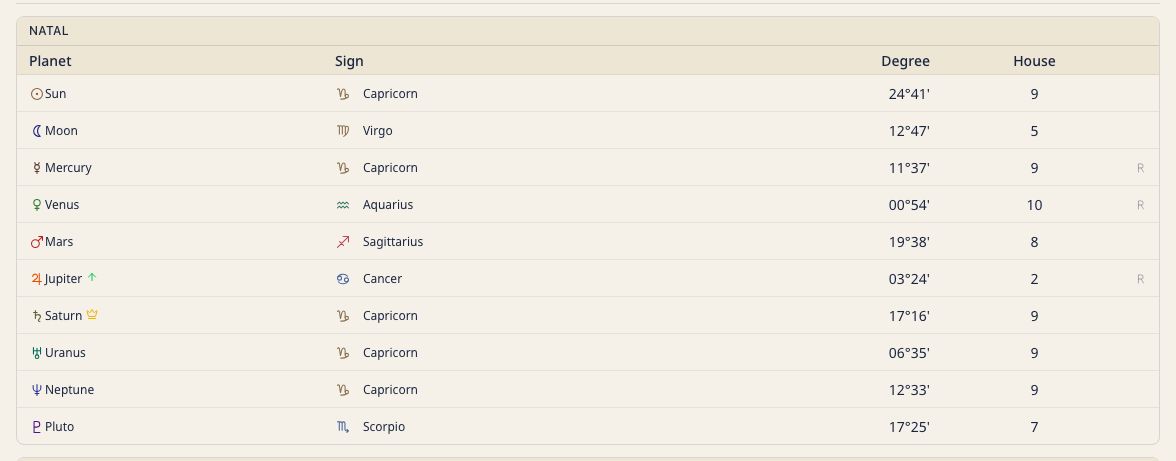
Show dignities is on from the start. Switch it under Display settings › Calc & tables › Tables and badges.
Mutual reception
Mutual reception occurs when two planets each sit in the sign the other rules. For example, if the Moon is in Capricorn (ruled by Saturn) and Saturn is in Cancer (ruled by the Moon), the two are in mutual reception. They are read as exchanging and supporting each other’s energy, like guests in each other’s home.
When the app detects a mutual reception, it shows a dedicated row in the form A♋ ↔ B♑, naming the two planets and the signs they are in. It uses the same traditional rulerships as the dignities, and counts only pairs linked by domicile (the classical rulers).
Show mutual reception is on from the start. Switch it on the Calc & tables tab of Display settings, under Tables and badges.
Declination and out-of-bounds
Most chart work uses zodiacal longitude, but declination (a body’s angular distance north or south of the celestial equator) has a meaning of its own. The planet table has a declination column, so you can see this second coordinate at a glance.
When a body’s absolute declination exceeds about 23.44° (the obliquity of the ecliptic, the most the Sun ever reaches), it is out of bounds (OOB). The app marks OOB bodies with a badge. Out-of-bounds planets are commonly read as expressing their energy in more extreme, unconventional ways.
The declination column and OOB badge are off from the start. Turn on Show declination on the Calc & tables tab of Display settings, under Tables and badges.
Fixed stars
Beyond the planets, certain fixed stars have a long interpretive tradition. HOSHIDOU uses eight: Regulus, Algol, Spica, Antares, Fomalhaut, Aldebaran, Sirius, and Procyon. For each natal body, it checks for a conjunction to one of them within the orb you set, and lists any hits in a dedicated fixed-stars table with the star name and the orb of the conjunction.
A fixed star is read almost entirely through conjunction, so the orb you allow strongly affects how many stars appear. A tighter orb shows only the closest, most significant contacts.
The fixed-stars display is off from the start. Turn on Show fixed stars on the Bodies tab of Display settings, and set the width with Fixed star orb. The orb starts at 1°.
Related
- Single Wheel: where dignity, mutual reception, declination, and fixed-star data appear
- Sect: the day/night distinction that shapes Hellenistic interpretation
- Profection Year: the time-lord timing technique
- Arabic Parts: calculated lots such as the Part of Fortune