Paid Plans and Purchases
Plan prices, and how to sign up, change, or cancel a paid plan and update your payment method from Plan & billing in the account menu.
HOSHIDOU uses a payment processor for secure payments. You can manage your paid plan entirely within the app.
Plans and pricing
| Plan | Price | Highlights |
|---|---|---|
| Hoshiyomi (Free) | Free | Single Wheel, Triple Wheel, and Synastry, up to 5 birth details entries, all tooltip reading levels |
| Hoshigatari | ¥550/mo (¥5,500/yr) | Unlimited birth details, synastry score and Composite, Astromap, advanced charts (Solar Return, Solar Arc, Lunar Return, Draconic, Harmonic), Today’s reflection |
| Hoshimichibiki | ¥1,650/mo (¥16,500/yr) | Everything in Hoshigatari, Connect AI (MCP), notes, snapshots |
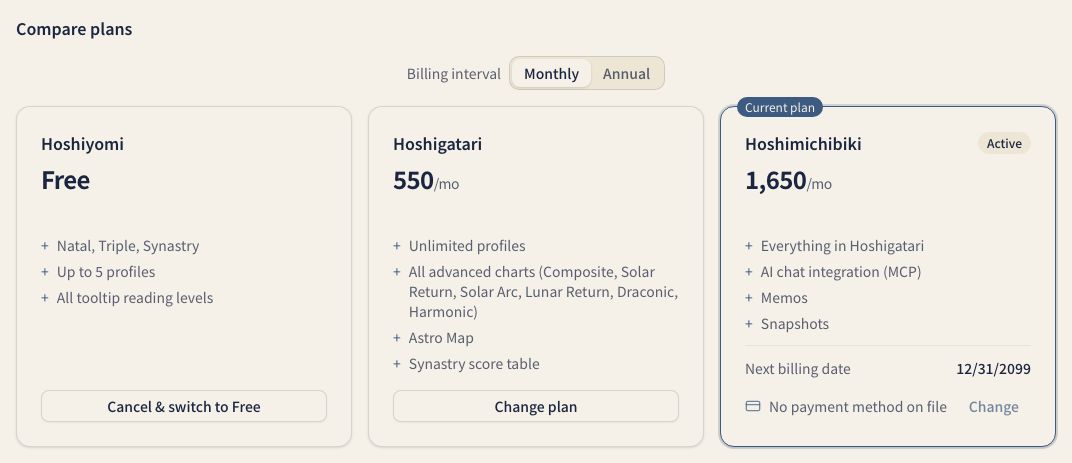
For a full feature comparison, see the Pricing page.
Annual billing
The paid plans, Hoshigatari and Hoshimichibiki, offer annual billing. Annual is priced at ten months of the monthly rate, which saves about two months, and suits long-term use. Switch between monthly and annual with the billing interval toggle (Monthly / Annual) in the plan comparison.
What each plan includes
| Feature | Hoshiyomi (Free) | Hoshigatari | Hoshimichibiki |
|---|---|---|---|
| Single Wheel, Triple Wheel, Synastry | Yes | Yes | Yes |
| Ephemeris and Home | Yes | Yes | Yes |
| Traditional techniques (Sect, Profections, Arabic Parts) | Yes | Yes | Yes |
| Chart export (PNG and PDF) | Yes | Yes | Yes |
| Birth details | Up to 5 | Unlimited | Unlimited |
| Synastry score | - | Yes | Yes |
| Composite | - | Yes | Yes |
| Astromap | - | Yes | Yes |
| Solar Return, Lunar Return, Solar Arc, Harmonic, Draconic | - | Yes | Yes |
| Today’s reflection | - | Yes | Yes |
| Notes (including AI notes) | - | - | Yes |
| Saved charts (Snapshots) | - | - | Yes |
| Connect AI | - | - | Yes |
During the beta, every Hoshigatari and Hoshimichibiki feature is free to use. Star Scrolls are separate from the plans, and you buy them one at a time.
Opening plan management
Open plan management from Plan & billing in the account menu, or from the Plan section of the account page. The account menu is under your name at the bottom of the sidebar.
- Open the account menu (your name at the bottom of the sidebar)
- Choose Plan & billing
The “Plan” page in your account opens. “Current plan” shows your plan, next payment, and payment method. “Compare plans” and “Invoices” appear below. When cancellation is scheduled, the end date and “Reactivate” appear; the next payment and card change controls are hidden.

Signing up for a paid plan
- On the Plan page, press Choose plan
- In Compare plans, pick monthly or annual
- Press Subscribe on the plan you want
- Enter your payment details on the checkout page
Your new plan features are available as soon as you sign up.
Changing or canceling
- Change: in “Compare plans”, press “Upgrade” or “Change plan” on the plan you want. The “Confirm plan change” dialog shows the estimated “Charge today” (prorated when applicable) and which features you gain or lose
- Cancel: press Cancel & switch to Free on the free plan’s card
- Update your payment method: open “Invoices and payment method”, or press “Change” beside the card on your current plan
A downgrade or cancellation takes effect at the end of the current period, and you keep your current features until then. Payments already made are not refunded.
Invoices
While you have a paid plan, an Invoices list (billing history) appears at the bottom of the Plan page, with the date, description, amount, and whether each was paid.
Frequently asked questions
Can I change plans anytime? Yes. You can upgrade or downgrade at any time. Upgrades take effect immediately.
What currency am I charged in? Prices are charged in Japanese yen. If your card is in another currency, your card company converts the amount.
What payment methods are accepted? Credit cards (Visa, Mastercard, JCB, AMEX), Apple Pay, and Google Pay.
Are prices tax-inclusive? Yes, all displayed prices include tax.
Related pages
- Star Scrolls — the Star Scroll types and how buying one at a time works apart from your paid plan.
- Star Scroll pricing — per-module pricing and how to build your own Star Scroll.
- Hoshimichibiki Plan Features — notes, snapshots, and Connect AI included with Hoshimichibiki.
- Connect AI — MCP integration is a Hoshimichibiki plan feature.
- Account — your name, sign-in, and language and appearance settings.
- Contact — questions about your plan or payments.