Solar Arc Directions
What Solar Arc directions are, how they differ from secondary progressions, year selection, and how to read the chart.
Solar Arc directions are a chart made by adding the same amount to every planet in the natal chart: the arc the progressed Sun has traveled since birth. People use it to look at the timing of turning points and major events.
What are Solar Arc directions
Solar Arc is a kind of direction. The arc is the distance the progressed Sun has actually moved since birth, roughly one degree per year, and the same amount is added to every natal planet. The ASC, MC, and houses stay as they are in the natal chart.
The angles between the planets (the natal aspects) do not change; all the planets turn together by the same amount. The times when a directed planet lands exactly on a natal point have long been read alongside events in a person’s life.
How Solar Arc differs from secondary progressions
Solar Arc directions and secondary progressions (SP) both use the “one day equals one year” idea, but they work out the planets’ movement differently.
| Factor | Solar Arc | Secondary Progressions |
|---|---|---|
| Movement | All planets advance by the same arc | Each planet moves at its own speed |
| Angles between planets | Same as natal | Change over time |
| Approach | Everything moves together; easy to time | Each planet is followed on its own |
How to access
You open a Solar Arc chart from Applied charts in the sidebar.
- Choose a person under Birth Details in the sidebar
- Select “Solar Arc” under Applied charts
You can also press the chart title on any chart screen and switch to it from there. The chart is calculated and displayed immediately.
Date selector
Pick any day in the date field at the top of the screen to view the Solar Arc chart for that day. Use it to look back at past events or ahead to coming periods. Today’s date is entered by default.
Reading the chart
In a Solar Arc chart, you compare the directed planets with the degrees of your natal planets and of the natal ASC and MC. The ASC, MC, and houses stay as in the natal chart. HOSHIDOU has no list of aspects from directed planets to natal points; the screen shows only the angles within the same chart.
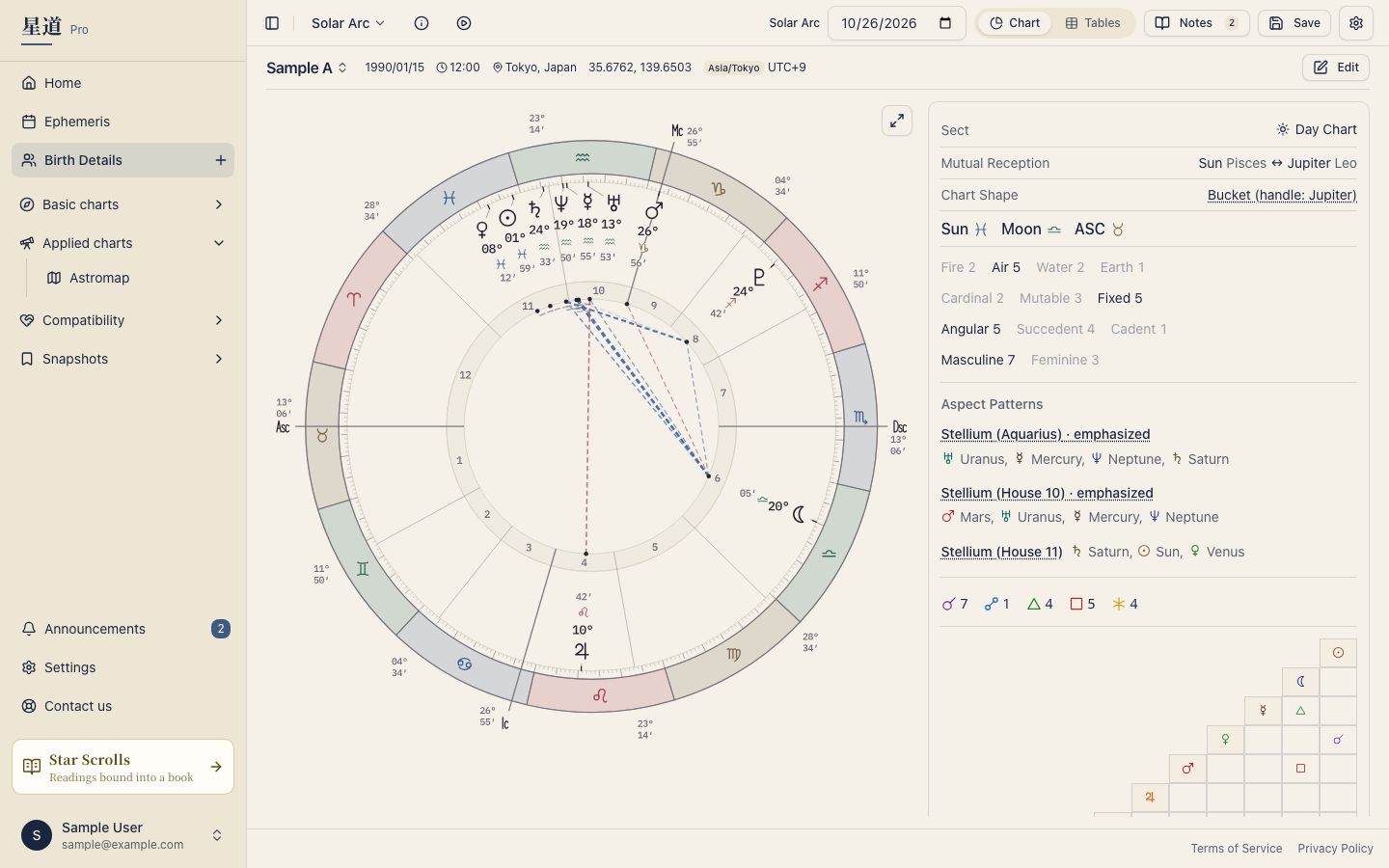
- A directed planet conjunct a natal planet: compare the degrees and look for overlaps. This is read as the strongest contact, and is often linked with turning points
- A directed planet near the natal ASC or MC: compare with the degree of the ASC or MC. It is read alongside changes in career or public role
- Directed planets to each other: every planet gets the same arc, so the angles among them stay as in the natal chart. Aspects among the directed planets never change, so you can ignore them
Pay special attention to overlaps within one degree. Since the arc advances roughly one degree per year, a one-degree orb corresponds to about a year.
For a detailed breakdown of chart components, see Single Wheel. To adjust which bodies and aspects are shown, use the gear in the top right of the chart screen (Display settings); see Points & Aspects Settings.
Table views and tooltips
Solar Arc charts have the same data panel and table view as the Single Wheel, including the planet table. Hover over (or tap) any planet glyph to see a tooltip showing the directed degree.
Tooltip content can be customized in Tooltip Settings.