Single Wheel
How to open the Single Wheel, what to look at first, how to read the wheel, and how to use the data panel and table view.
The Single Wheel displays a natal chart as a single circular diagram. It plots the positions of the planets and points calculated from your birth date, time, and location onto a wheel, giving you the entire chart at a glance.
How to open it
Choose yourself under Birth Details in the sidebar, then press Single Wheel under Basic charts. On the chart screen, press the title to open the chart-switching menu. Chart and Tables change the view of this same Single Wheel.
Three things to look at first
When you open it for the first time, find the sign and house of your Sun, Moon, and Ascendant (ASC). On Home, “Your core” is the Sun, “Feelings” is the Moon, and “How you come across” is the ASC.
On the wheel, each planet’s glyph has its sign symbol and degree beside it. To check the house, look at the house column of the planet table. Switch to Tables and the same information appears as a table.
Chart anatomy
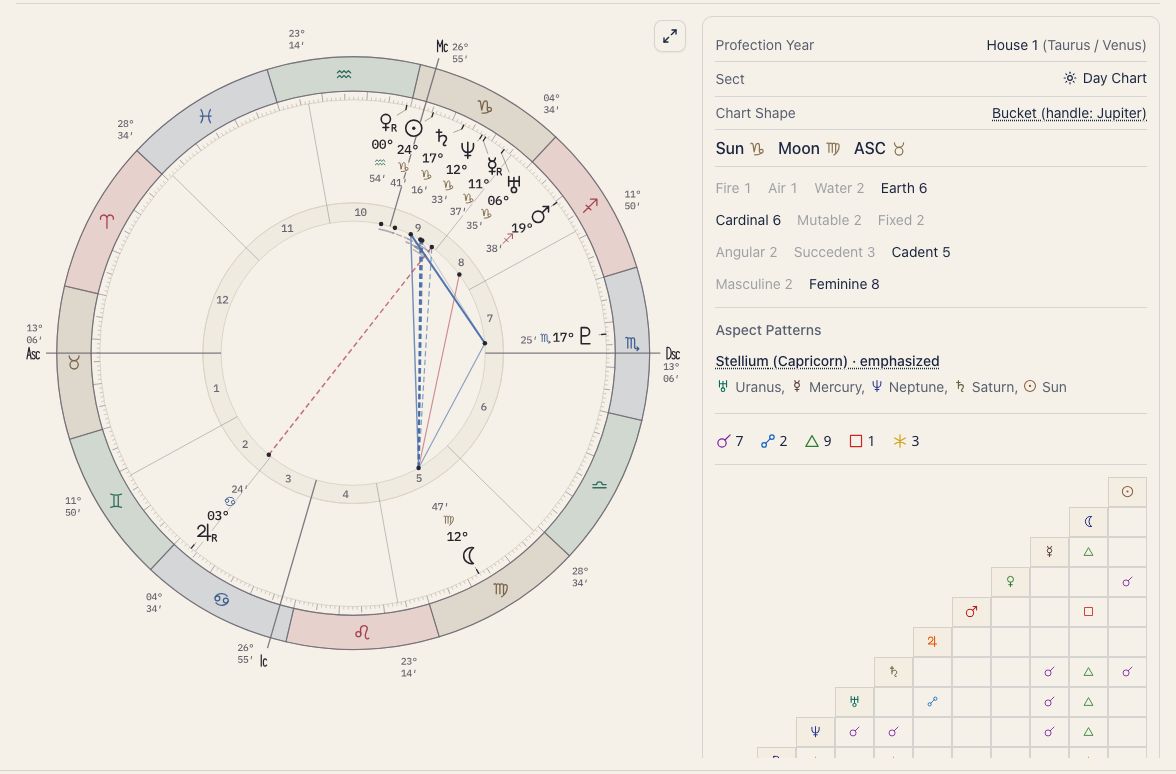
The wheel has four layers.
Zodiac ring
The outer ring shows the 12 zodiac signs. Each sign spans 30°, and signs are color-coded by element (fire, earth, air, water). The ring shows which sign each planet occupies.
Choose the wheel’s colors with Chart theme on the Look tab of Display settings (the gear in the top right of the chart screen). The options are Classic, Colorful, Midnight, Parchment, and Previous colors.
House lines
Lines radiating from the center divide the wheel into 12 sectors called houses. Each house corresponds to an area of life, such as self, finances, or communication. House positions depend on birth time and location, so two people born on the same day can have very different house placements.
Planet glyphs
Planets and other bodies appear as glyphs (symbols) placed at their zodiac degree on the wheel. Beside each glyph, the degree, sign symbol, and minutes are stacked in a column. A small “R” marks a retrograde planet.
Under Labels on the Look tab, you can turn the degree, sign, minute, and R on or off one by one. Three quick picks are also there: Full, Compact, and Glyph only. On a phone, the wheel uses Compact until you pick one.
Aspect lines
Colored lines across the center of the wheel connect planets that form an angle (an aspect) with each other.
- Red lines: hard aspects (square, opposition, and so on)
- Blue lines: soft aspects (trine, sextile, and so on)
The colors depend on the chart theme. In Classic, the lines are shades of gray. A conjunction is drawn as a short arc along the inside of the circle instead of a line.
Tighter aspects (smaller orb) are drawn with thicker lines, and wider aspects (larger orb) with thinner ones. An aspect that is still becoming exact is drawn solid, and one that is separating is dashed. On the Aspects tab you can turn the line thickness and the solid/dashed distinction on or off.
Hover over a line to make it, and the two planets it joins, stand out. Press it to keep it selected; press an empty part of the wheel to release it.
For the aspect types, see Aspects.
The data panel
On the Chart view, a data panel sits to the right of the wheel (below it on a phone). From the top, it holds:
- Badge rows: profection year, sect, mutual reception, and chart shape, one row each. The first three are covered under “Once you are comfortable” at the end of this page.
- Chart shape: one of seven named types, judged from the ten planets Sun to Pluto. Bundle (packed into a narrow range), Bowl (within a half circle), Bucket (nearly a half circle, with one planet set apart as the “handle”), Seesaw (two groups facing each other), Locomotive (spread over about two thirds of the circle, with one gap of 120° or more), Splash (scattered through many signs), and Splay (fits none of the others).
- Distribution: how many planets fall in each of these groups.
- Elements (fire, earth, air, water)
- Modalities (Cardinal, Fixed, Mutable)
- House types (Angular = houses 1, 4, 7, 10; Succedent = 2, 5, 8, 11; Cadent = 3, 6, 9, 12)
- Masculine and Feminine (yang and yin; fire and air signs are masculine, earth and water signs feminine)
- Aspect patterns: a list of any Grand Trine, Grand Cross, and similar figures found; see Aspect patterns
- Aspect matrix: the aspects between every pair of planets in a grid, so you do not miss an angle hiding behind overlapping lines
A lopsided count tells you where the chart is concentrated. Many planets in the Fire row, for example, means many planets sit in fire signs.
Available bodies
The Single Wheel can display the following planets and sensitive points. Choose which ones to include on the Bodies tab of Display settings. At first, only the ten planets Sun to Pluto are shown.
| Category | Bodies |
|---|---|
| Planets | Sun, Moon, Mercury, Venus, Mars, Jupiter, Saturn, Uranus, Neptune, Pluto |
| Asteroids | Chiron, Pholus, Ceres, Pallas, Juno, Vesta |
| Sensitive points | North Node (true node), South Node, Lilith (True), Vertex, East Point, Part of Fortune |
The North Node and Lilith use true positions. Mean positions are not available. The South Node sits exactly opposite the North Node (180°) and appears only while the North Node is shown.
Table view
Switch from Chart to Tables at the top of the screen to see the numbers in table form. Use it when you need exact figures that are hard to read from the wheel.
Planet table
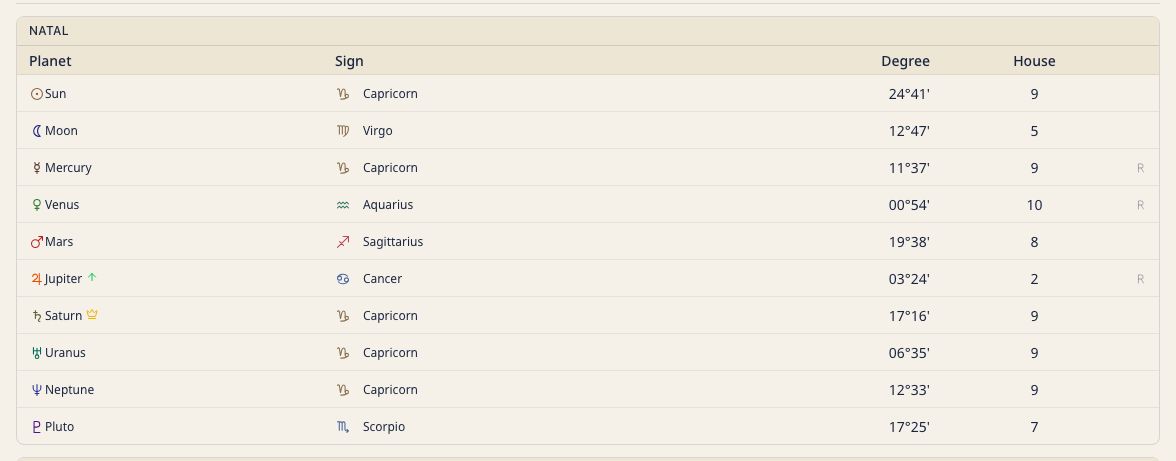
Lists each planet’s sign, degree, house, and retrograde status in a compact grid. It is the quickest way to spot a stellium (a cluster of planets in one sign) and to review every placement at once.
The dignity badge next to a planet name shows its condition by symbol and color. A crown (yellow) is Domicile, an up arrow (green) is Exaltation, a down arrow (orange) is Detriment, and a cross (red) is Fall. Hover over a badge (press it on a phone) for a short explanation. The declination column also appears here.
Arabic Parts and fixed stars
The Arabic Parts you turned on, and the conjunctions between planets and any fixed stars you turned on, each have their own table.
House cusp table
Lists the sign and degree of each of the 12 house cusps. Use it to see which sign each house begins in.
Tooltips
Hovering over (or pressing, on a phone) a planet glyph, sign, or house on the chart opens a tooltip with the planet name, sign, degree, and house. For an aspect, hover over its cell in the aspect matrix.
Change tooltip content and behavior under Reading help on the Calc & tables tab of Display settings. See Tooltip Settings.
Once you are comfortable: traditional layers
Besides modern astrology, the Single Wheel carries rows and tables for older techniques. Essential dignity (how easily a planet shows its strength in a sign), mutual reception (two planets each in the sign the other rules), sect (day or night birth), declination (distance north or south of the celestial equator), profection (advancing the houses by age), and fixed-star conjunctions appear as badges or extra rows and tables. They are written for people who are studying astrology, so you can skip them at first.
Exporting the chart
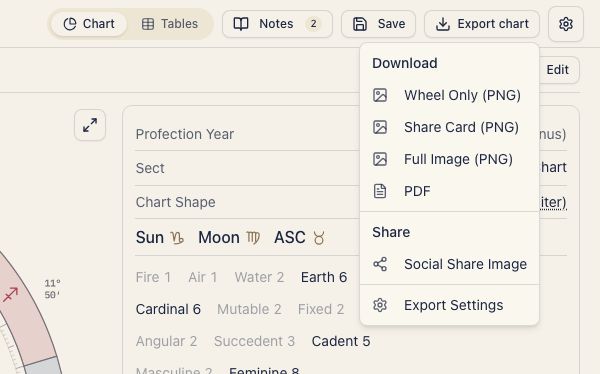
You can export your Single Wheel chart as an image or PDF. For instructions and supported formats, see Chart export.