Stars touching your chart
How Home shows where today's sky touches your birth chart, through the "where it touches you today" section and the date strip.
On Home, the section titled “Where today’s sky touches your chart” shows where today’s sky makes an angle to your birth chart. For example, if today’s Mars is square your natal Sun, that pairing appears on the “Your core” card.
What you need
Home needs the birth details marked as “Me” (the Me badge). The Home wheel and the one-line summary at the top are built from this birth date.
- You are signed in - an account is required
- A “Me” entry exists - the entry with the Me badge under Birth Details is the one used
Without one, Home says “Your birth details aren’t added yet” and shows only today’s sky. The Add birth details button adds them. You can start without a birth time; noon is used for the calculation. For how an unknown birth time affects what you see, read Managing Birth Details.
Reading the section
The section lists three cards and one extra card. The higher the card, the more weight that spot carries in your birth chart.
- How you come across - your natal Ascendant (ASC)
- Your core - your natal Sun
- Feelings - your natal Moon
- Other - where today’s Moon sits among your natal houses
Each card’s title names today’s planet and the angle, for example “Today’s Mars at 90°”. Below it, one sentence names the natal house today’s planet is in and what that angle tends to stir. When there is no major angle, the card says “No major angles today”.
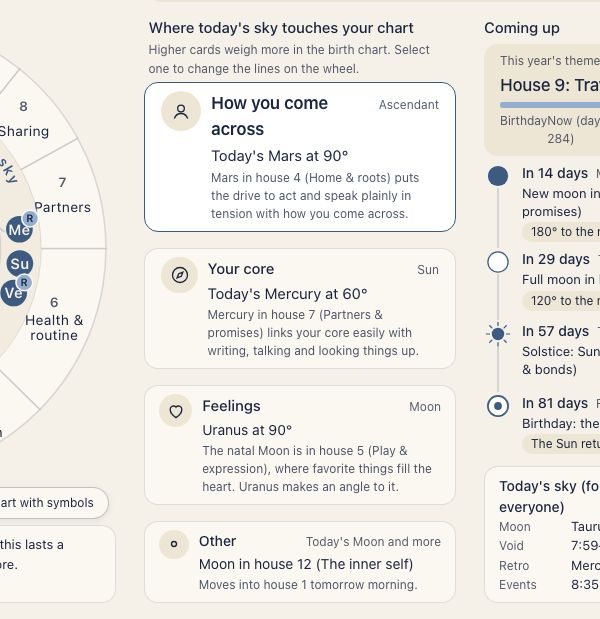
Press a card and the wheel’s line switches to that card’s angle. The wheel starts as a plain circle without sign symbols. The button at the lower right, Chart with symbols, switches to the standard two-ring wheel (natal plus transit).
How angles are picked
The planets from the Sun to Pluto in today’s sky are checked against your natal Ascendant, Sun, and Moon for the major angles: conjunction, 60, 90, 120, and 180 degrees. The allowed orb is 8 degrees, or 10 degrees when the Sun or Moon is involved. This is Home’s own rule and cannot be changed in settings.
Angles from slow planets (Jupiter, Saturn, Uranus, Neptune, Pluto) appear on the cards and are also gathered into the one-line “This period” note. The same angle can show for months or years, so read it as an ongoing flow rather than a change from day to day.
Looking at another day
The date strip at the top of Home shows the seven days of the week, starting Monday. Change the day with the arrows or by pressing a date, and the wheel and cards redraw for that day’s sky. When you are on a day other than today, Back to today appears.
Use it to check how tomorrow’s sky, or last week’s, touched your chart.
What comes next
“Coming up” on the right of Home lists full and new moons, the turning points of the seasons (the equinoxes and solstices, each with the house of yours it falls in), and your birthday, labeled Today, Tomorrow, or In N days. Without birth details, it lists retrograde and direct stations instead. The first card, “This year’s theme”, shows the year running from your birthday. Press a dated row to open Events in the Ephemeris for that month, with the day highlighted.
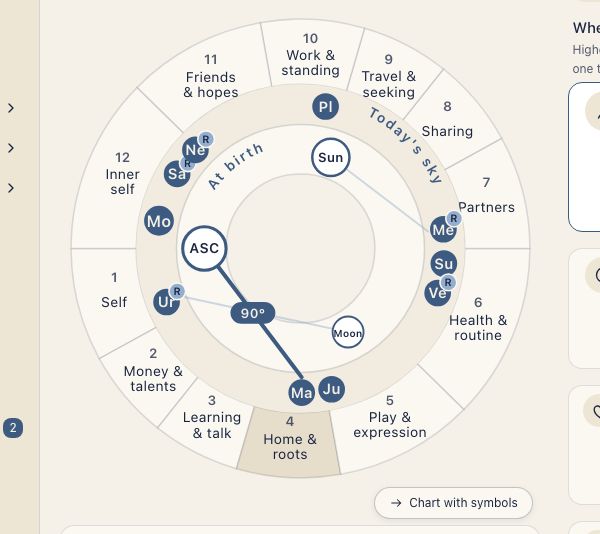
When you want more detail
The Home section is limited to today’s sky against your natal Ascendant, Sun, and Moon. For every planet or a closer look at another date, use these charts.
- Triple Wheel - pick a date and lay the transits and progressions over your natal chart. The aspects to natal are listed beside the wheel
- Ephemeris - monthly planetary positions, with ingresses, stations, aspects, and new and full moons
The Show personal transits switch and Alert orb (3° to start) are under App in Settings. They are a separate feature from this section. Home uses its own orb rule for Where today’s sky touches your chart: 8°, or 10° when the Sun or Moon is involved.