Forecast
Transit forecast and progressions timeline: see when moving planets aspect your birth chart in a dated table and timeline, with filters and calendar export.
The Forecast page is a transit forecast and progressions timeline. It lists the days ahead when a moving planet makes an exact aspect to a planet in your birth chart. Open it from Forecast under Basic charts in the sidebar.
There are two methods. Switch between them with Transits and Progressions in the header.
- Transits: the planets in the sky on each day. Jupiter through Pluto and Chiron are shown from the start.
- Progressions: planets advanced one day for each year of life (secondary progressions). The Sun, Moon, Mercury, Venus and Mars are shown.
The list comes in two views, Table and Timeline, switched with the icons in the header. Find when something happens in the list, then click the date to see the whole sky on that day.
The period, filter and calendar sit in the header, as on the other charts. On a phone they are on the This page tab of the gear Settings at the top right.
Choose the period
Set the period with the start date and Length in the header. It starts as one year from today. Lengths are 3 months, 1 year, 3 years and 10 years.
The start can also be in the past, to look back over the last year. Events that entered the orb before the start and are still in effect during the period are listed too.
Table
Each row is one event. The table is split into In effect now and Coming up, and each part is sorted by the next exact date. If the start is in the past, events that ended during the period go under Past.
The columns are the moving planet, the aspect, the natal point, the next exact date, other dates and the period. The moving planet is in darker text and the natal point in lighter text.
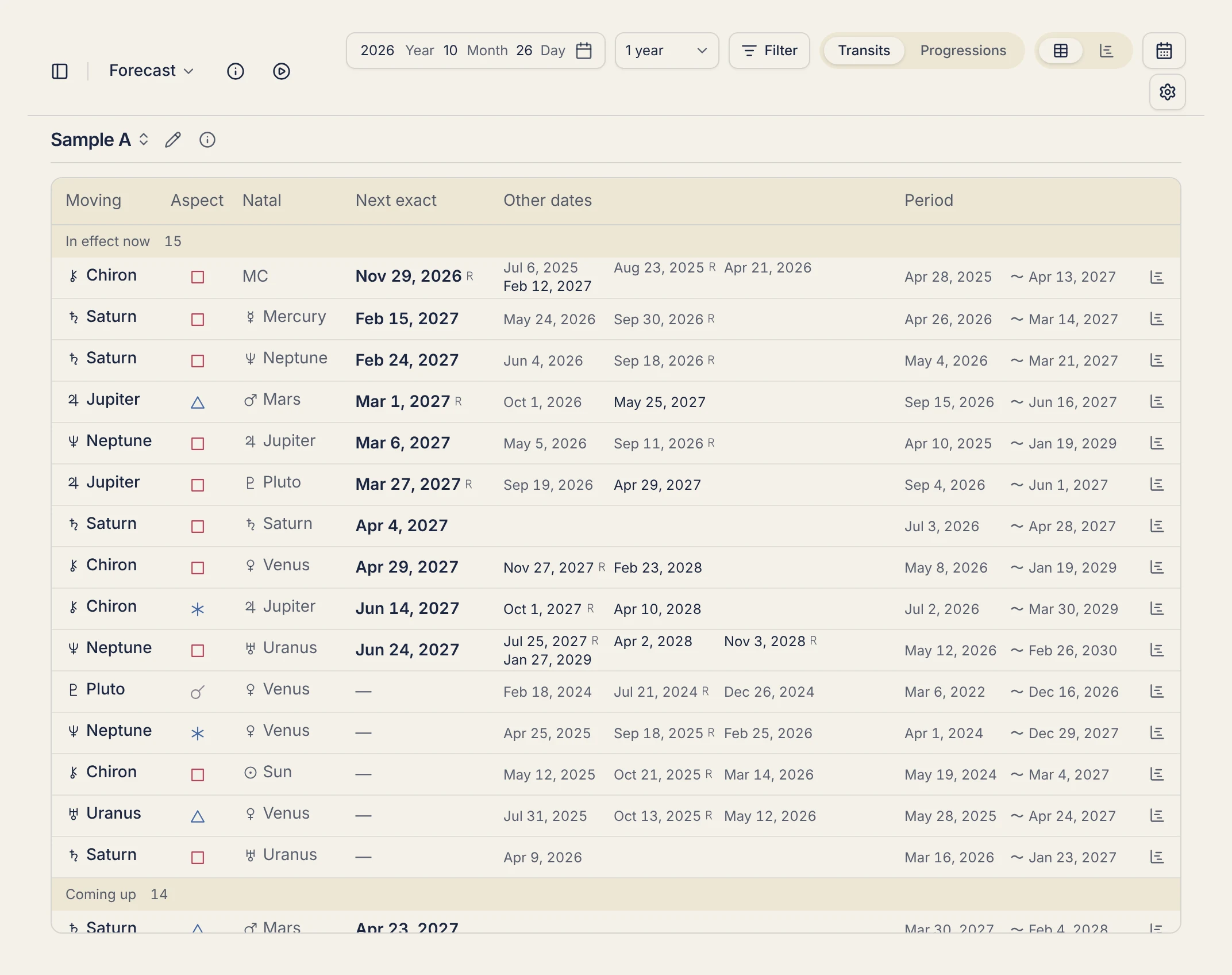
- In effect now holds every row whose period includes today, even while a retrograde has taken the planet out of orb for a while.
- The aspect is shown as a symbol. Hover over it or click it to read about that combination. Readings are written for transits of Jupiter through Pluto and Chiron, and for progressions.
- When a planet turns retrograde and makes the same aspect exact three times, the three dates share one row. Dates that fall while the planet is retrograde carry the retrograde symbol.
- When an event enters and leaves the orb without becoming exact, the row shows the day of the closest approach and the orb on that day.
- Past dates are dimmed.
- On a phone each event has two parts: the planets, aspect and next exact date on top, and the period and other dates below.
Progressed sign and house ingresses
The progressions table also lists the days the progressed Moon and Sun move into a new sign or into a house of your birth chart. The aspect column shows →, the natal column shows the sign or house, and the next exact column shows the day. The progressed Moon moves to the next sign about every two and a half years.
Clicking a date
Clicking a date opens the Triple Wheel for that day. Clicking a row does not open a chart. For someone with no birth time, a transit date opens the natal chart with the transits laid over it instead.
In the chart that opens, the line for that row’s aspect is drawn and lit, and everything else fades. Its cell in the grid on the right is outlined too. Click the line or the cell again, or click an empty part of the wheel, to clear it. ASC and MC rows have no line, so the moving planet and the natal axis light up instead. A row whose planet is hidden in the chart settings does not light up.
For a progressed event, the aspect list on the right of the Triple Wheel shows the progressed-to-natal pair.
Clicking a date also marks that row. The Triple Wheel header then shows ← Forecast. That link or your browser’s back button returns to the same tab, row and scroll position, even if you changed the date on the Triple Wheel.
The chart shows the sky at noon on that day. The exact moment usually falls at another hour, so for fast planets the orb on the chart is not 0°.
The row you are looking at
Click a row to mark it as the row you are looking at. Its background is tinted. Click another row to move the mark, or the same row again to clear it.
The mark carries between the table and the timeline. Switching tabs scrolls to that row, and its background brightens softly twice to show you where it is. The same happens when you come back from the Triple Wheel. Reloading the page keeps the mark. If a filter takes the row out of the list the mark goes away, and it comes back when you restore the filter. Switching between transits and progressions clears it.
The button at the right end of a row marks that row and opens the timeline. Your browser’s back button returns to the table.
Timeline
Time runs from left to right. Each moving planet and natal point pair has one row, and other aspects of the same pair sit on that row too.
In the left column, as the heading at the top left shows, the bold line is the moving planet and the lines below it are natal points.
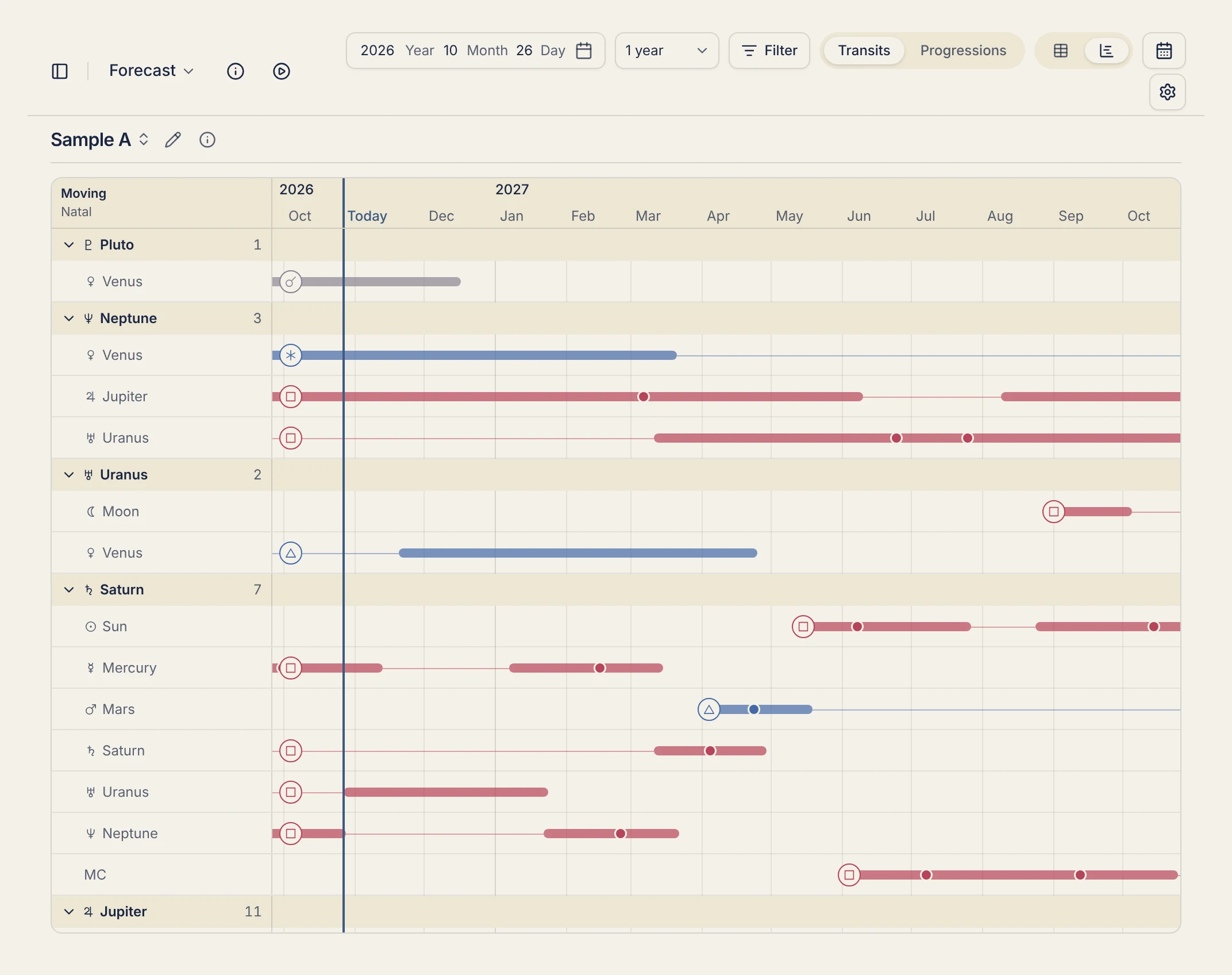
- A bar marks the time within orb, and a dot marks each exact date. Click a dot to open the Triple Wheel for that day.
- The round symbol on a bar is the aspect. When you scroll sideways it stays just to the right of the left column, so you can always tell which aspect you are looking at. Hover over it or click it to read about it.
- When a retrograde takes the planet out of orb before it comes back, a thin line joins the bars.
- A vertical line marks today. The timeline starts one month before the start date, so you can see what leads up to the bars in effect.
- Rows are grouped by moving planet, with the slowest at the top. Click a planet’s heading to open or close its group. A closed heading draws all of that planet’s bars on one line. On 3 and 10 years, Jupiter starts closed.
- A progressed sign or house ingress is a single diamond on its day.
- Click a bar to mark its row as the row you are looking at, and click it again to clear the mark. Click a planet’s name in the left column to mark the row on that line with the nearest upcoming exact date. With a row marked, the table tab takes you back to the table, scrolled to that row.
- The marked line is tinted and its bar is thicker and darker. While that bar is on screen, other bars fade a little. Click an empty part of a line, or press Esc, to clear the mark.
For 3 and 10 years, scroll sideways. Today appears at the top left once today is out of view. A bar’s real ends are rounded, and an end that continues off screen is flat.
On a phone the timeline shows three months at a time; use the arrows at the top to turn the pages. Rows with no bar in those three months are hidden.
Colors
Bars and dots are colored by the kind of aspect: conjunction, harmonious (trine and sextile) and tense (square and opposition). They use the same colors as the aspect lines on the chart, so they change with the theme.
Filter
Filter chooses the moving planets, the natal points and the aspects. Your choices are kept on the device you use. All and None beside each heading turn that whole group on or off.
- Transits of the Sun, Mercury, Venus and Mars come to about 400 events a year. They can be chosen only when the length is 3 months.
- The ten planets, ASC and MC are on from the start as natal points. The North Node and Chiron can be added.
The orb comes from the triple-wheel orbs under Calculation in the settings: 3° for transits and 1° for progressions to start with. The list follows the zodiac setting as well, so in sidereal the exact dates differ from tropical.
Calendar
Calendar puts the events into your calendar app, one all-day event for each exact date.
- Export (.ics): saves the events now on the screen as a file, which your calendar app reads once.
- Subscribe: creates a subscription URL for one person. Your calendar app reads this URL on a schedule and adds the events from last month through the next eleven months. As the months go by, new events are added.
What the subscription holds is set by the filter and zodiac at the time you create it. To change them, adjust the filter and create the URL again. The subscription does not include transits of the fast planets (the Sun through Mars).
The Ephemeris calendar subscription holds events in the sky that are the same for everyone. A forecast subscription holds events for one birth chart, so each person gets a separate calendar.
Unknown birth time
Without a birth time, the chart is calculated for a birth at noon.
- For transits, the ASC and MC are left out as natal points. Rows for the natal Moon are marked Approx.: the Moon moves about 6° in half a day, so the dates can be off by months.
- For progressions, the timing can shift by about half a year, and a note at the top of the list says so. House ingresses are left out. The Triple Wheel needs a birth time, so clicking a date does not open a chart.
With AI
When you connect an AI, it can read up to three years of the forecast list, and can answer a question such as “What does Saturn bring next year?” without working out the dates itself.