Single Wheel
How to read the Single Wheel chart, understand its anatomy, and use the table views.
The Single Wheel displays a natal chart as a single circular diagram. It plots the positions of celestial bodies calculated from your birth date, time, and location onto a wheel, giving you an intuitive overview of the entire chart at a glance.
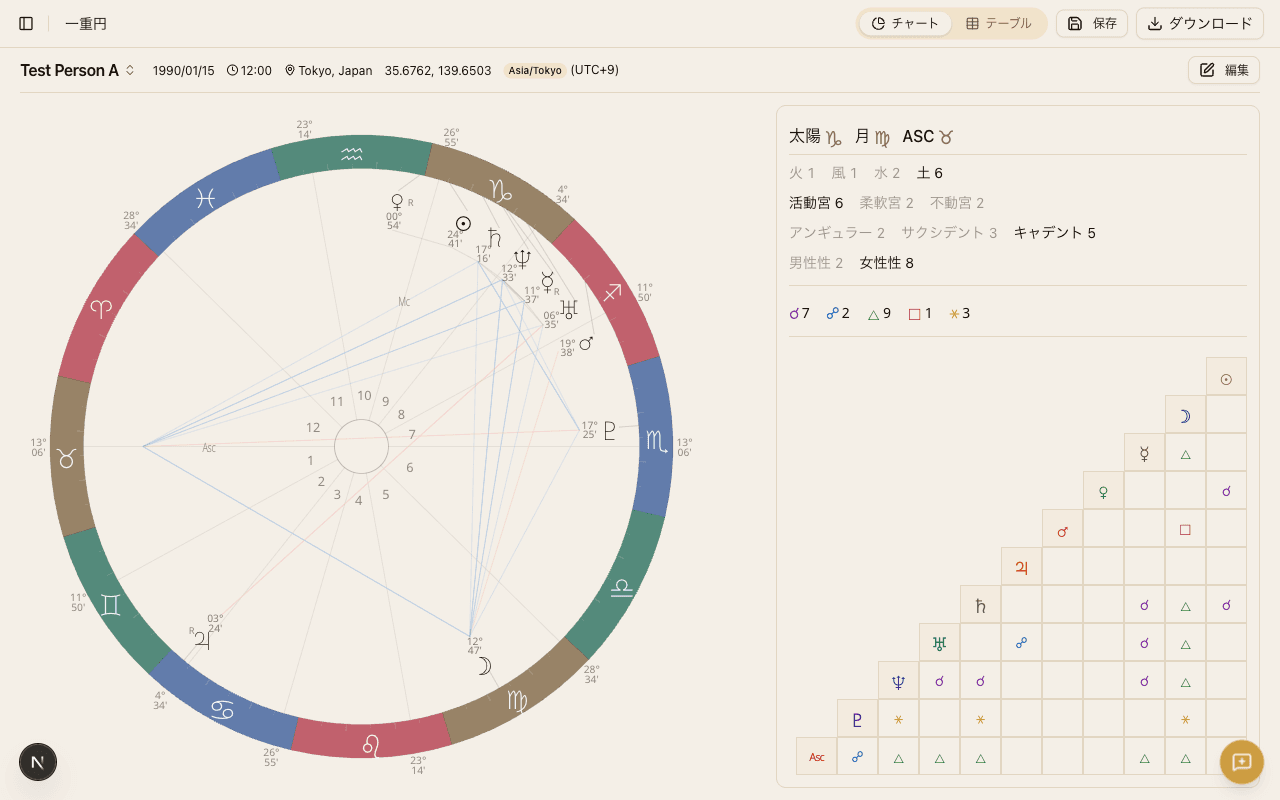
Chart Anatomy
The Single Wheel is composed of four visual layers, each conveying different information.
Zodiac Ring
The outer colored ring represents the 12 zodiac signs. Each sign spans 30 degrees, and signs are color-coded by element (fire, earth, air, water). The ring provides an immediate visual reference for which sign each planet occupies.
House Lines
Lines radiating from the center divide the wheel into 12 sectors called houses. Each house corresponds to a different area of life — self, finances, communication, and so on. Because house positions depend on birth time and location, two people born on the same day can have very different house placements.
Planet Glyphs
Planets and other celestial bodies appear as glyphs (icons) placed at their calculated zodiac degree on the wheel. A quick look at glyph positions tells you which sign and house each planet falls in.
Aspect Lines
Colored lines drawn across the center of the wheel connect planets that form angular relationships (aspects).
- Red lines - Hard aspects (square, opposition, etc.)
- Blue lines - Soft aspects (trine, sextile, etc.)
Aspect line thickness varies based on orb tightness. Tighter aspects (smaller orb) are drawn with thicker lines, while wider aspects (larger orb) appear thinner.
For a full explanation of aspect types, see Aspects.
Available Celestial Bodies
The Single Wheel can display the following planets and sensitive points. You can choose which bodies to include from the Settings screen.
| Category | Bodies |
|---|---|
| Planets | Sun, Moon, Mercury, Venus, Mars, Jupiter, Saturn, Uranus, Neptune, Pluto |
| Asteroids | Chiron |
| Sensitive points | North Node, South Node, Lilith, Part of Fortune |
Essential Dignity
The planet table shows an essential dignity badge indicating whether each planet is in its domicile, exaltation, detriment, or fall. See Traditional Techniques for the full explanation.
Sect
The planet table shows a sect badge marking whether each planet is "in sect" or "out of sect" based on a day or night birth. See Sect for details.
Mutual Reception
A mutual reception badge appears when two planets each occupy the sign ruled by the other. See Traditional Techniques for how this is interpreted.
Declination and Out-of-Bounds
The planet table includes a declination column and flags planets that exceed about 23.44 degrees of declination as "out-of-bounds" (OOB). See Traditional Techniques for what this means.
Profections
The Single Wheel highlights the currently active profection house and its time lord for the chart's year. See Profection Year for the full timing technique.
Fixed Stars
When enabled, a fixed stars table lists prominent fixed stars near your natal planets with their conjunction orbs. See Traditional Techniques for more, and toggle the display in Points & Aspects Settings.
Table Views
Tabs beneath the chart let you switch between several table views. These are useful when you need precise numerical data that is hard to read from the wheel alone.
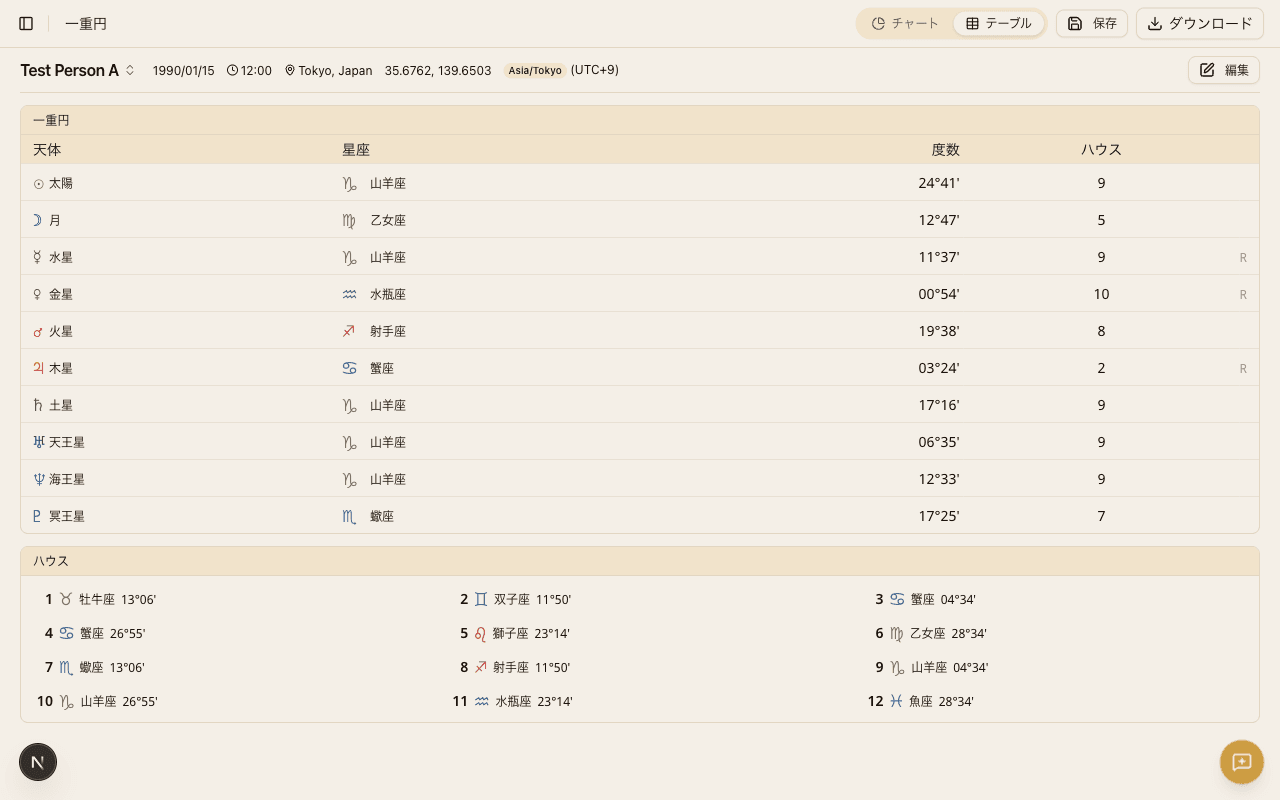
Planet Table
Lists each planet's sign, degree, house, and retrograde status in a compact grid. This is the fastest way to spot stelliums (clusters of planets in the same sign) and to review all placements at once.
Aspect Matrix
Displays all aspects between every planet pair in a grid format. While the wheel's aspect lines give you a visual impression, the matrix ensures you never miss an angular relationship hiding behind overlapping lines.
Element & Modality Distribution
Shows the count of planets in each of the four elements (fire, earth, air, water) and three modalities (cardinal, fixed, mutable). Use this to quickly assess the overall balance or any strong concentrations in the chart.
House Cusp Table
Lists the sign and degree of each of the 12 house cusps. This is handy when you want to see which sign rules each house without scanning the wheel.
Tooltips
Hovering over (or tapping) a planet glyph or aspect line on the chart reveals a tooltip with detailed information — planet name, sign, degree, and house. This lets you inspect any element of the chart without leaving the wheel view.
Tooltip content and behavior can be adjusted in Tooltip Settings.
Exporting the Chart
You can export your Single Wheel chart as an image or PDF. For instructions and supported formats, see Chart Export.
Account Settings
How to update your profile, change your password, manage your subscription, and view purchase history.
Traditional Techniques
An overview of the Hellenistic and traditional techniques HOSHIDOU surfaces - essential dignities, mutual reception, declination and out-of-bounds, and fixed stars.