Triple Wheel
How to read and interact with the triple wheel (transit and progressed chart).
This page explains how to view and read the triple wheel chart, what each ring represents, and how to configure the transit date and location.
What Is the Triple Wheel?
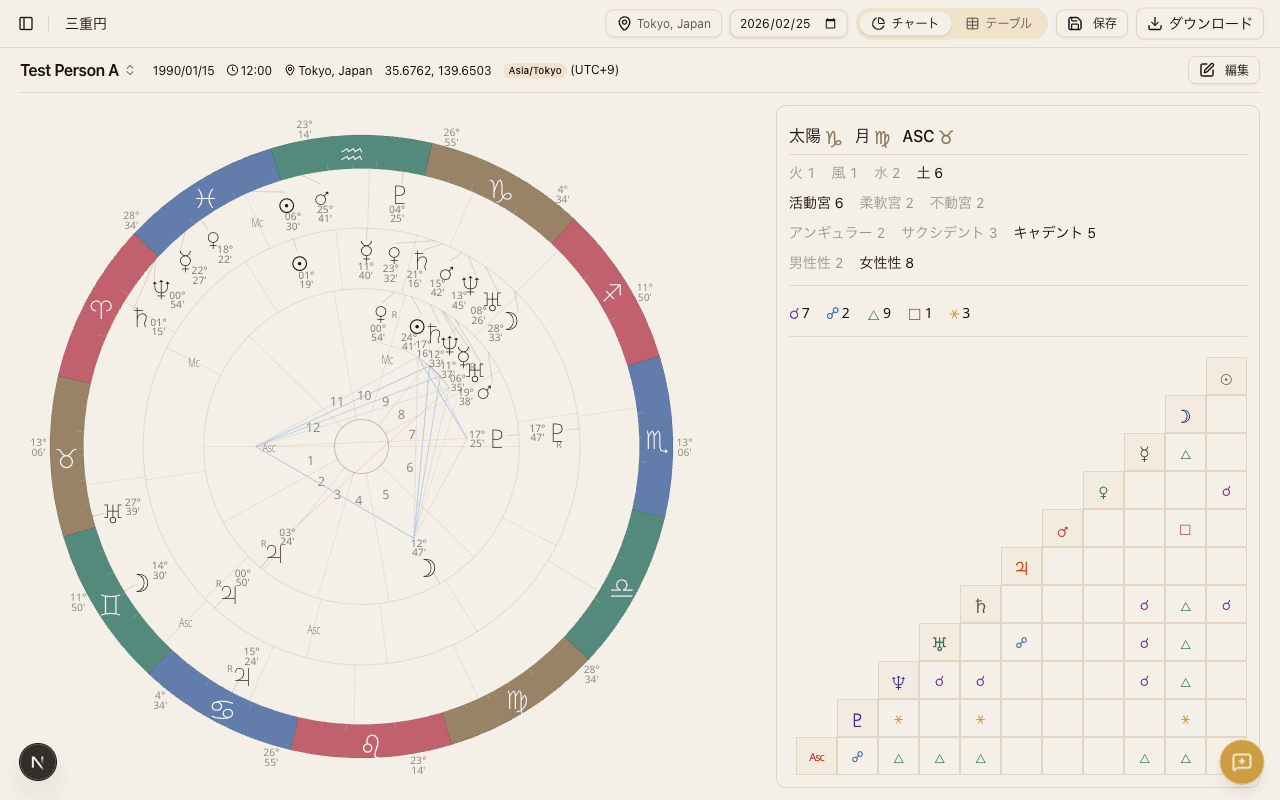
The triple wheel displays three concentric rings showing natal, progressed, and transit planetary positions simultaneously. It lets you overlay the sky at the moment of birth with the sky at any other point in time, all within a single chart.
By seeing how current and progressed planets relate to the birth chart, you can explore life cycles, timing, and the themes that are active in a given period.
The Three Rings
The triple wheel is organized from the inside out, with each ring representing a different type of planetary data.
Inner Ring: Natal Chart
The innermost ring shows the natal chart - the positions of the planets at the exact moment of birth. These positions are fixed and never change.
Every transit and progression reading uses this natal chart as its reference point. Think of it as the permanent blueprint of the person's astrological makeup.
Middle Ring: Progressed Chart
The middle ring shows the progressed chart, calculated using a technique called secondary progressions. This method advances the planets by equating each day after birth to one year of life.
For example, the progressed Sun moves roughly 1° per year, entering a new sign approximately every 30 years. Progressions symbolize inner growth and shifts in consciousness - the slow, seasonal changes of a lifetime.
Outer Ring: Transit Chart
The outermost ring shows the transit chart - the actual positions of the planets in the sky on the current date (or any date you choose).
When a transiting planet forms an aspect to a natal planet, it can signal concrete events, turning points, or shifts in focus. Transits from Saturn, Jupiter, and the outer planets are especially significant because they unfold over longer periods and mark major life chapters.
Setting the Transit Date
The triple wheel lets you freely change the date used for transit and progressed calculations.
- Click the date picker at the top of the chart to open a calendar and select any date
- When you change the date, both the transit ring (outer) and the progressed ring (middle) update to reflect the planetary positions for that moment
- Set a past date to review historical transits, or a future date to explore upcoming influences
The default date is today.
Setting the Transit Location
House cusps in the transit chart depend on the geographic location.
- Use the location picker to set the place used for transit calculations
- Changing the location recalculates the house cusps in the transit ring
- It is common to set this to your current city of residence, or to the location of an upcoming event
Cross-Ring Aspects
One of the most powerful features of the triple wheel is the cross-ring aspect lines drawn between planets in different rings.
- For example, if transiting Saturn is conjunct natal Sun, an aspect line is drawn across the rings to highlight the connection
- You can also see progressed-to-natal aspects, such as progressed Moon square natal Venus
- Aspect lines are color-coded by type (hard vs. soft), following the same scheme used in the single wheel
Reading cross-ring aspects lets you quickly identify which natal planets are being activated at a given time.
Table View
Below the chart, the table view presents natal, progressed, and transit positions side by side in a three-column layout.
- Each column lists the sign, degree, and house placement for every planet
- Precise degree differences that are hard to read on the wheel are immediately visible in the table
- Retrograde planets are marked with an R symbol
The table view is especially useful when you want to check the exact orb of a particular cross-ring aspect.